MCP, ACP, and A2A: How each agent protocol works and when to use them
Three agent protocols solve three different problems, and teams keep mixing them up. Markus Kohler explains what MCP, ACP, and A2A each connect, shows a harness that puts Claude Code and Codex on the same task, and covers the limits you should know before you build on any of them.
Developers have preferences when it comes to which model they prefer for specific tasks, myself included. For example, Opus 5.5 is best at finishing tasks in one go, while models like GPT-6.1 Sol are best when the human stays close to the project and in the loop. This makes sense; they are designed with entirely different philosophies. So the next obvious move is to make them work together, and that is where we introduce the concept of Agent Client Protocol (ACP). We will also dive into Model Context Protocol (MCP) and agent-to-agent protocol (A2A).
Rather than competing with one another directly, these three technologies help multi-agent AI workflows by connecting different pairs of things. Here’s how I keep them straight, and what I built with one of them.
MCP, ACP, and A2A: How they work and where they run
| Protocol | Connects | Where it runs | Example |
|---|---|---|---|
| MCP (Model Context Protocol) | An agent to its tools | Each tool runs as its own server | Claude Code reading your error tracker and database |
| ACP (Agent Client Protocol) | An app, such as an editor or your own script, to an agent | On your machine | Zed, JetBrains, or Neovim talking to one or multiple coding agents |
| A2A (Agent2Agent) | One agent to another agent | Across servers, over HTTP | Your agent calling a partner’s or vendor’s agent |
If you only take away one thing from this post, it is: MCP is agent to tools, ACP is app to agent, and A2A is agent to agent.
Model Context Protocol (MCP): giving an agent something to work with
Let’s start with how MCP works first. Say you use Claude Code. It can read your repo, run your tests, and fix a bug. But it only knows what is in your files. Ask it why customers see a blank checkout page, and it cannot tell you, because it cannot see your error tracker or your database.
MCP uses that method to connect an agent to your tools. Each tool runs as its own server, and the agent calls it when needed. Ask the same question again, and the agent pulls the error from Sentry, finds the broken carts in Postgres, and opens a pull request on GitHub with the fix.
The advantage: You build each MCP server once. Codex, Gemini, Copilot, and Cursor can all use the same ones.
Agent Client Protocol (ACP): one way for editors to talk to agents
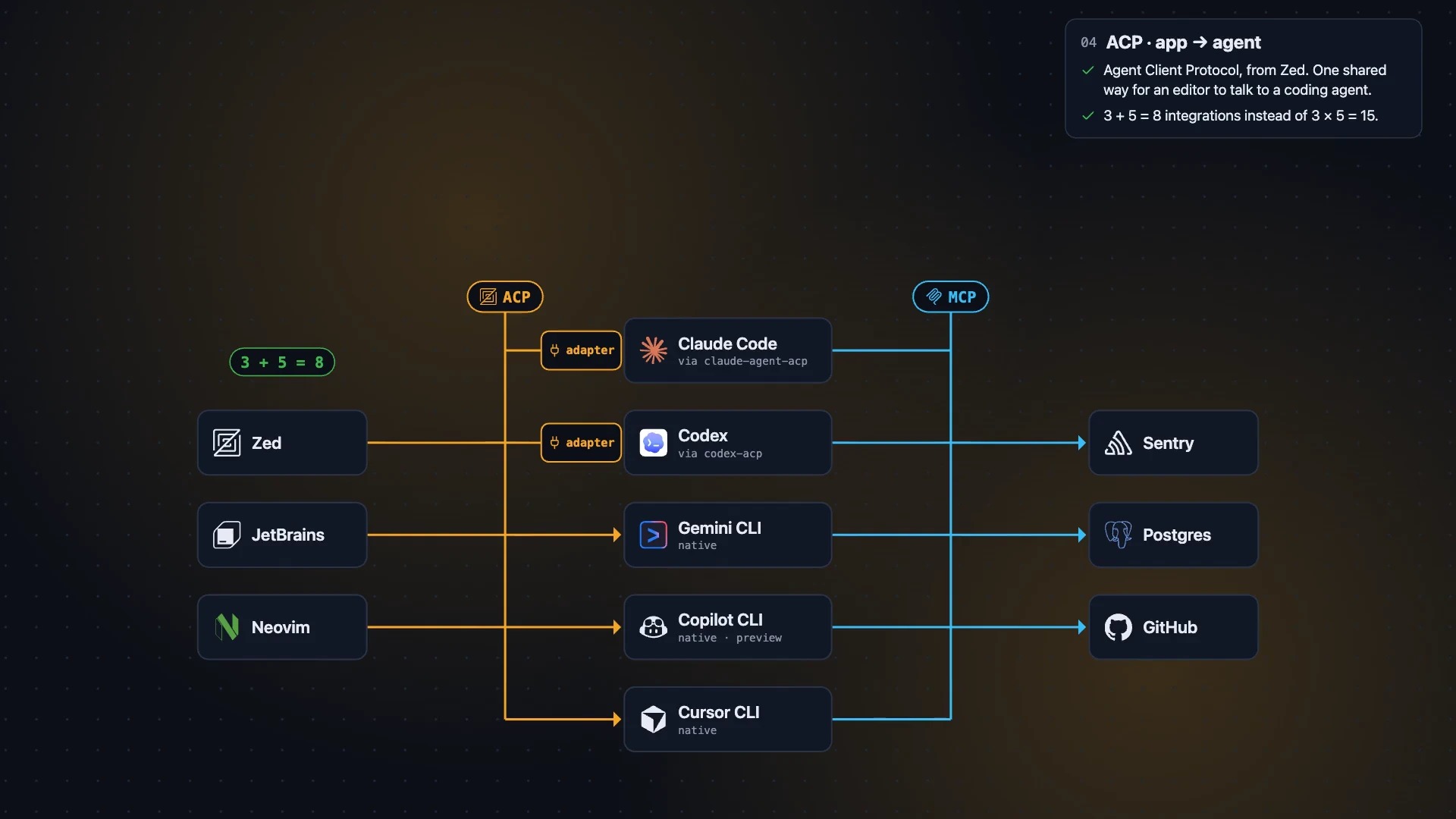
Developers want to use these agents in their editor, whether that is Zed, JetBrains, or Neovim, so they can chat with the agent and see its changes alongside their code.
The catch is that each agent works a little differently, so each editor has to build a separate integration for each agent. With three editors and five agents, you end up with 15 integrations just to keep everything in sync.
ACP comes from Zed and defines a shared way for an editor to communicate with a coding agent. The editor starts the agent on your machine, sends it your prompt, and the agent sends back what it’s doing. Each editor supports ACP once, and each agent supports it once. Some agents, including Claude Code and Codex, don’t speak ACP natively, so they connect through small adapters.
JSON messages over the wire
What crosses the wire is only JSON messages. The editor initializes the agent, then starts a session and tells the agent which folder to work in and which MCP servers it may use. Your prompt follows, and the agent streams back its plan, the tools it is calling, and its answer.
Notice how the two protocols complement each other: You still use MCP for the tools. ACP just passes your MCP servers to the agent for use.
ACP clients don’t have to be an editor
This is the part I find most interesting: An ACP client doesn’t have to be an editor; it can be your own script.
I pay for both Claude and ChatGPT, and normally those two agents never talk to each other. So I wrote a small harness: one ACP client that runs Claude Code on Opus and Codex side by side, on the plans I already pay for.
I gave it one task: add rate limiting to the login route.
- Claude read the code and wrote a plan.
- The harness handed that plan to Codex for review.
- Codex found two problems. Limiting by IP address would lock out a whole office that shares one IP. And the counter was kept in memory, so it wouldn’t be shared across three servers.
- The harness sent the review back to Claude. Claude fixed both issues, and the tests passed.
Together, these technologies simplified my workflow and allowed me to automate processes I previously would need several connectors to complete.
Limits to know before you build on this
ACP is useful, but go in with clear eyes.
Vendor terms can change. Running my Claude plan through ACP works because Anthropic allows it today. In May, Anthropic said ACP and Agent SDK usage would move off the subscription and onto a separate monthly credit billed at API prices. It paused that change on the day it was due to start, and nothing has changed since, but it could come back. Anthropic also doesn’t let you build a product where other people sign in with their Claude plan unless it approves the arrangement. That makes this a good fit for your own setup and a poor fit for shipping as an app.
It is mostly local. Today, ACP is for agents on your own machine. Remote support is still in development, so my harness can only reach agents it can start on my laptop.
When the agent is not on your machine: A2A
If the agent you need runs somewhere else, such as on a partner’s or vendor’s server, you want A2A. Each agent publishes an agent card that says what it can do and where to reach it. Agents then send tasks to each other over HTTP.
One more source of confusion: there used to be a second ACP. IBM’s Agent Communication Protocol was merged into A2A in 2025. When people say ACP today, they almost always mean the Agent Client Protocol from Zed.
What this means for your team
- Standardize on MCP for tools. It is the one layer every major agent already shares.
- Use ACP to script the agents you already pay for. It’s a cheap way to try planner-and-reviewer workflows. Check your vendors’ terms first, and keep it internal.
- Plan for A2A where agents cross a boundary. The moment an agent has to reach a system owned by a partner, a customer, or another business unit, you are outside what ACP covers.
That last point is where we spend our time at Blocks.ai. Once agents need to work across company and network boundaries, the questions change from “does it speak the protocol?” to “who is allowed to call whom, and what stays where?” We built Blocks.ai so agents connect outbound to a shared network rather than opening inbound ports, and call other agents by name rather than IP addresses, so teams can work with an agent that lives somewhere else without moving sensitive data to it.
I think ACP is the protocol people are sleeping on. It lets you script the agent you are already paying for, at least for as long as Anthropic continues to allow it. Try it out, then tell me what you think over on X.
Try it: Connect your first agent in minutes at blocks.ai/docs/quickstart.